> For the complete documentation index, see [llms.txt](https://help.trackstack.app/llms.txt). Markdown versions of documentation pages are available by appending `.md` to page URLs; this page is available as [Markdown](https://help.trackstack.app/inbox/core-concepts-and-reviewing-tracks.md).
# Core Concepts & Reviewing Tracks
This section introduces the key ideas that power Trackstack and explains the terminology you'll encounter throughout the platform.
Understanding Trackstack’s core concepts will help you navigate your submissions more efficiently and make better decisions when reviewing and sending music. Below are a few key concepts you’ll use regularly inside Inbox.
***
### **Shortlisting**
Shortlisting is a way to mark tracks you want to revisit, consider, or keep an eye on. It’s your personal “maybe” list — ideal for submissions that show promise but need a second listen or more context. It is specific to **Label** type Inboxes and signals to the artist you are moving forward in some way with the track.
Shortlisting is especially useful for:
* Tracks you want to return to later
* Building a pool of potential signings
* Narrowing down a large batch of submissions
* Organising music for future listening or releases
Shortlisted tracks remain easy to find in a dedicated Stacks, helping you stay organised as you make decisions.
***
### **Supporting**
Supporting a track is the highest form of positive feedback on Trackstack. It signals that you genuinely like the submission and intend to support it in your sets. Unique to Personal type Inboxes, marking a track as Supporting is a final action and the artist should not expect any further communications or actions from you.
Support can mean:
* You plan to play it in a set
* You want to test it before playing it
* You’re adding it to a playlist
* You’re saving it for later
Supporting also strengthens your relationship with the sender and contributes to your overall Professional Relationship Management on Trackstack.
***
### **Declining**
Declining a track lets you clearly signal that a submission isn’t the right fit for you. It helps keep your Inbox organised by removing tracks you don’t want to revisit, while still acknowledging the sender’s effort. Declining also contributes to transparent Professional Relationship Management, ensuring artists get a clear response rather than being left waiting.
We strongly believe that receiving a "Decline" is better than being left in the dark, therefore every track reviewed will receive a supporting, shortlist or decline.
***
### **Stacks**
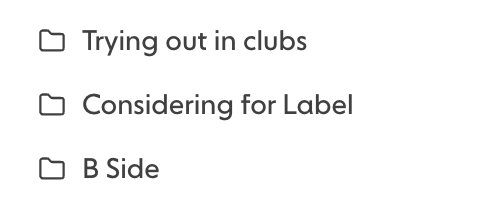
Stacks are playlists or collections you create to organise tracks inside Trackstack. You can build Stacks for sets, releases, playlist ideas, show prep, or any custom workflow. Adding a track to a Stack helps you group submissions meaningfully, making it easier to review, compare, and act on them later.
Putting a track into a Stack automatically notifies the sender that you have reviewed the submission and are moving it forward in some way. We allow you to create Stacks to match your workflow and depending on the Stack you shortlist a track into, it will send a custom message to the sender.
Here are some examples of typical Stacks and their automated messages:
* **Second Listen** - "Thanks for sending this over, I want to revisit it with fresh ears and will follow up once I’ve had another listen"
* **Considering Release** - "I’m consider this track for a potential release on my label, please hold for 2 weeks and will keep you updated as things progress"
* **Trying out in sets** - "I’ll be testing it in upcoming sets. I will share feedback and if I will consider for release once I’ve had the chance to play it out."
***
### **Submission Credits**
Submission Credits represent how many tracks you can **send** to other public inboxes each month. Every track uses one credit, meaning one submission with three tracks uses three credits. They apply only to outbound submissions — not receiving. Pro members receive **1,000 submission credits** per month, with credits renewing monthly.\
\
We will soon offer the opportunity to buy extra submission credits.
***
### **Feedback Templates**
Feedback Templates help you respond to submissions quickly and consistently. Instead of typing out the same message each time, you can save preset responses for declining tracks. Templates help streamline communication, maintain professionalism, and make artists feel acknowledged. It also takes the effort away from giving specific feedback that will help the artist reflect, learn and improve.
Every Inbox has a default feedback template that is sent when clicking the thumbs down "Decline" button, this can be configured in the Inbox settings menu under "Preferences". You can create as many templates as you'd like based on your workflow.